
Screenshots

App details
- Version
- 6.1.0
- Size
- 53.82 MB
- Updated
- July 20, 2021
- Requires
- Windows 10
- Language
- English
- License
- Free
- Developer
- yetiforcecom
- Category
- Windows OS
SoftPas in:
This product is also available in the following languages:
About YetiForce CRM
Download YetiForce CRM – free open‑source CRM solution for businesses
Overview of YetiForce CRM
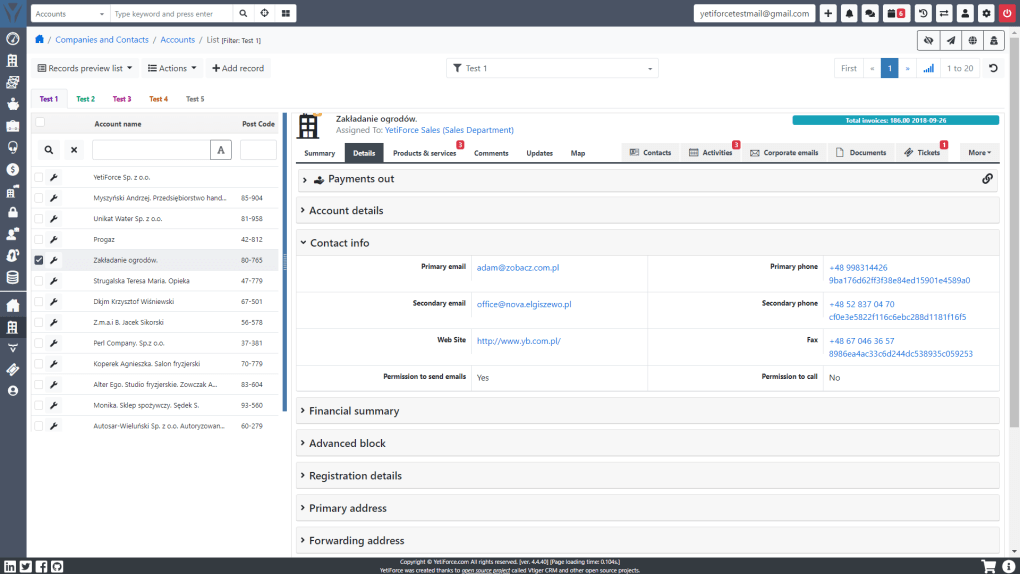
YetiForce CRM is a free, open‑source Customer Relationship Management platform that empowers companies of any size to centralize sales, support, marketing, and project‑management processes in a single, secure dashboard. Built on a modern PHP framework, YetiForce delivers a surprisingly rich feature set without the licensing fees that burden many commercial CRMs. The software supports up to twelve distinct business processes, ranging from lead capture and opportunity tracking to inventory control and service ticketing. What sets YetiForce apart from competitors such as Freshsales or Zoho CRM is its vibrant community of developers who continuously contribute code, bug fixes, and new modules. This collaborative approach ensures that the platform evolves quickly, adding integrations for PBX, SMS, LDAP, social media portals, and even map services. The user interface is intentionally intuitive: a clean, responsive layout works on any mobile browser, letting sales reps, support agents, and managers stay productive from laptops, tablets, or smartphones. Advanced analytics are built directly into the system, with configurable widgets, graphs, and dashboards that can be tailored per role. Administrators retain granular control over which visualizations appear for each user, making it easy to surface the most relevant KPIs without overwhelming staff. Because YetiForce is open source, businesses can customize or extend the core codebase to meet niche requirements, and the same modifications are automatically propagated across all future releases, including the free edition. The platform also offers three optional service packages—hosting + support, cloud + support, and an “8‑hour development assistance” bundle—allowing organizations to choose the level of professional help that matches their budget and technical expertise.
Key Features and Functionalities
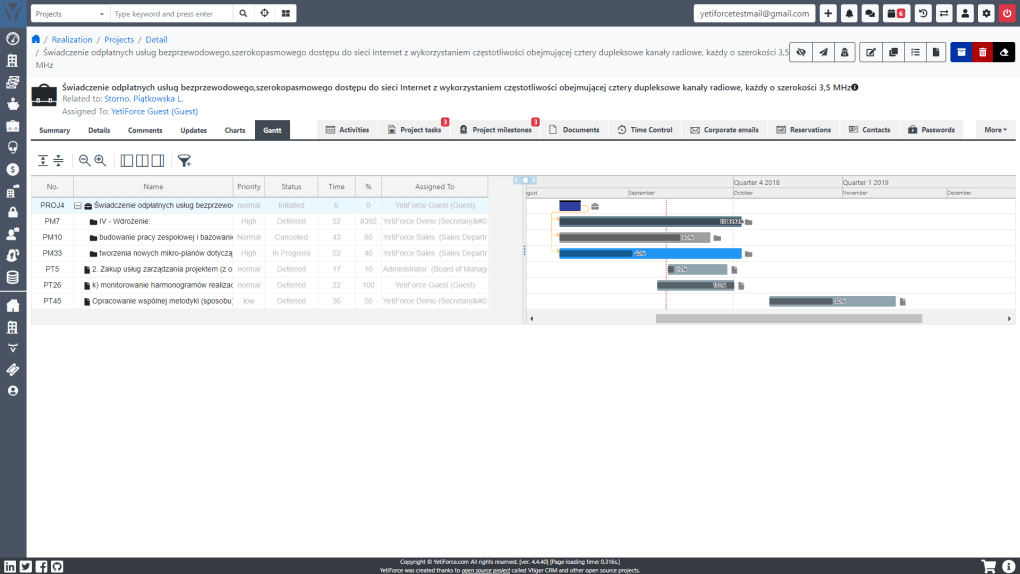
- Multi‑Process Management: Supports up to twelve business workflows, including sales, marketing, project management, HR, and help‑desk.
- Responsive UI: Fully compatible with desktop browsers and mobile devices, ensuring seamless access on Windows, macOS, Android, and iOS.
- Integrated Communication: Native PBX, SMS gateway, and email integration let users call, text, or email contacts without leaving the CRM.
- Social & Map Connectivity: Pulls data from Facebook, LinkedIn, Twitter, and Google Maps to enrich contact records and visualize territories.
- Advanced Analytics: Drag‑and‑drop widgets, custom graphs, and real‑time dashboards help decision‑makers spot trends instantly.
- Role‑Based Access Control: Administrators assign permissions per module, field, and widget, guaranteeing data security.
- LDAP & SSO Support: Seamlessly integrates with corporate directories for single‑sign‑on across the enterprise.
- Automation Engine: Workflow triggers, email templates, and scheduled tasks automate repetitive actions, reducing manual effort.
- Open‑Source Extensibility: Plugins and custom modules can be added via the marketplace, with community‑driven updates.
- Calendar & Task Management: Built‑in calendar syncs with Google Calendar and Outlook, supporting daily, weekly, and monthly views.
Beyond the core list, YetiForce’s modular architecture means that additional capabilities—such as e‑commerce integration, inventory tracking, or AI‑driven lead scoring—can be installed with a few clicks. The platform also provides RESTful APIs for developers who need to connect external applications, making it a flexible hub for any digital ecosystem. Because the codebase follows strict coding standards, organizations can trust that customizations remain maintainable and upgrade‑compatible, a frequent pain point in proprietary CRMs. Security is reinforced through password hashing, CSRF protection, and optional two‑factor authentication, ensuring that sensitive customer data stays protected even in highly regulated industries.
Installation, Compatibility, and Daily Usage
System Requirements & Compatibility
YetiForce CRM runs on any server that supports PHP 7.4 or higher, MySQL 5.7 or MariaDB 10.3, and a web server such as Apache or Nginx. It is fully compatible with Windows 10/11, Linux distributions (Ubuntu, CentOS, Debian), and macOS environments. For mobile users, the responsive web interface works flawlessly on Android 8+ and iOS 13+ browsers, eliminating the need for separate native apps.
Step‑by‑Step Installation
- Download the package: Visit the official YetiForce website and click the “Download Free CRM” button. The file is a compressed
.ziparchive. - Upload to your server: Extract the archive and upload the
ytffolder to the desired web directory using FTP or SCP. - Create a database: Log into phpMyAdmin (or use the CLI) and create a new MySQL database with a dedicated user. Grant all privileges to that user.
- Run the installer: Navigate to
https://yourdomain.com/ytf. The web‑based installer will check system dependencies, then prompt you for database credentials and admin account details. - Configure email & SMS: After the core install, go to the “Settings → Integration” menu to connect your SMTP server and SMS gateway.
- Secure the installation: Disable the
/installdirectory, set proper file permissions (typically755for directories,644for files), and enable HTTPS.
Everyday Workflow
Once installed, users log in with their corporate credentials or the built‑in account. The dashboard presents a customizable set of widgets—sales funnel, upcoming tasks, recent emails—allowing each user to focus on the metrics that matter most. Lead capture forms can be embedded on your website; new submissions automatically create contacts, trigger email nurturing sequences, and assign owners based on round‑robin rules. Sales reps can drag opportunities through stages, attach documents, and log calls directly from the PBX integration. Support agents manage tickets with SLA timers, auto‑escalation, and knowledge‑base linking. Managers monitor performance through real‑time graphs, export CSV reports, and schedule automated snapshots to be emailed each week. Because the platform is cloud‑ready, you can also opt for the YetiForce‑hosted version, which removes the need for server maintenance while preserving all functionality.
Pros, Cons, and Frequently Asked Questions
Pros
- Completely free core version—no hidden licensing fees.
- Highly customizable and extensible via open‑source plugins.
- Robust multi‑process support covering sales, support, HR, and more.
- Responsive design works on Windows, macOS, Android, and iOS.
- Strong community support and regular updates.
- Integrated communication tools (PBX, SMS, email).
- Advanced analytics with role‑based dashboards.
Cons
- Initial self‑hosting setup requires basic server knowledge.
- Some advanced modules may need paid extensions or professional services.
- Documentation, while improving, can be fragmented for beginners.
- Enterprise‑grade support is only available through paid packages.
FAQ
Is YetiForce CRM truly free for unlimited users?
Yes, the core edition of YetiForce CRM is open‑source and can be installed for any number of users without paying licensing fees. Optional paid packages add hosting, priority support, or development assistance.
Can I migrate data from another CRM such as Zoho or Salesforce?
YetiForce provides import wizards for CSV files and offers API endpoints that allow you to script migrations from most major CRMs. Community‑contributed tools also exist for direct Zoho or Salesforce data transfers.
What level of security does YetiForce CRM offer?
The platform includes password hashing, CSRF protection, role‑based access controls, optional two‑factor authentication, and supports HTTPS encryption. Regular security patches are released by the community.
Is there a mobile app for YetiForce CRM?
While there is no native app, the responsive web interface works perfectly on Android and iOS browsers, providing the same functionality as the desktop version.
How does the support model work for the free version?
Free users can access community forums, documentation, and GitHub issue tracking. For guaranteed response times, you can purchase the “hosting + support” or “cloud + support” packages, which include email and ticket‑based assistance.
Conclusion & Call to Action
YetiForce CRM delivers a powerful, cost‑effective alternative to pricey commercial solutions. Its open‑source nature means you can start with a completely free installation, customize the system to match your unique workflows, and scale up with professional support when needed. Whether you’re a small startup looking for a lean sales tracker or a mid‑size enterprise needing a full‑featured, multi‑process platform, YetiForce’s modular design, robust analytics, and cross‑device compatibility make it a compelling choice. The vibrant developer community ensures that new features—like AI‑driven insights or deeper social media integrations—will continue to arrive without additional licensing headaches. If you’re ready to modernize your customer relationship management while keeping budgets under control, download YetiForce CRM today and experience the freedom of truly open software.
Download YetiForce CRM now and start automating your business processes within minutes.
Guides & Tutorials
How to install YetiForce CRM
- Click the Download button above.
- Once redirected, accept the terms and click Install.
- Wait for the YetiForce CRM download to finish on your device.
How to use YetiForce CRM
This software is primarily used for its core features described above. Open the app after installation to explore its capabilities.
User Reviews
No reviews yet. Be the first to share your experience.
You may also like
more
Llama 2
Free-to-use large language model As the new addition to Meta’s arsenal of langua...

NotebookLM
Revolutionizing the note-taking and idea-generation process NotebookLM is an exp...

Github co pilot
AI-inspired software development and coding platform GitHub Copilot is a browser...

Google Gemma
Google’s lightweight AI models Introducing Google Gemma , a family of cutting-ed...

AI Image Enlarger
A free app for Windows, by ai-image-larger. AI Image Enlarger is a free software...

DALL E
AI-driven text-to-image transformation engine DALL·E is a free graphic and desig...